
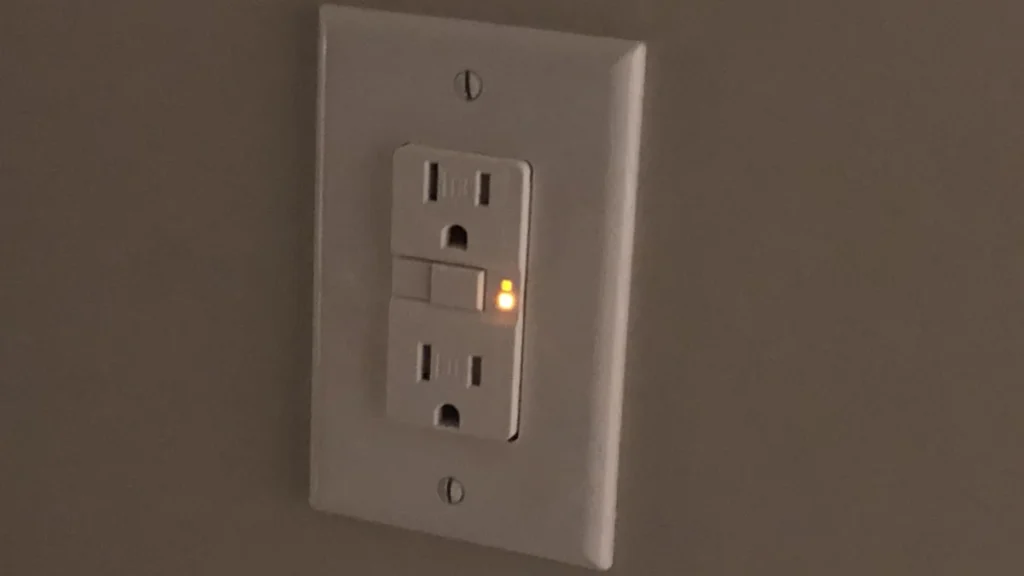
In the modern household, electrical infrastructure is often taken for granted until something goes wrong. We plug in our appliances, charge our devices, and expect a seamless flow of energy. However, when an outlet begins to flash an unfamiliar color—most commonly orange or amber—it acts as a diagnostic signal that something in your home’s electrical ecosystem requires attention.
Understanding these indicators is more than just a matter of convenience; it is a critical component of home safety. While many homeowners assume an orange light is a universal sign of failure, the reality is more nuanced. Depending on the specific hardware, that glow could signify anything from a routine surge-protection status to a critical safety trip or the end of an outlet’s operational lifespan.
Main Facts: The Anatomy of an Electrical Warning
The primary function of an indicator light on any electrical device is communication. Manufacturers implement these lights to bridge the gap between complex internal circuitry and the end user. When an outlet, power strip, or smart socket glows orange, it is almost always communicating one of three things: a safety trip, a functional status, or an overload warning.
The GFCI: Your First Line of Defense
Ground Fault Circuit Interrupter (GFCI) outlets are the most common culprits for alarming orange lights in residential settings. Mandatory in areas where water and electricity are in proximity—such as kitchens, bathrooms, laundry rooms, and garages—these outlets are designed to save lives.
A GFCI monitors the current flowing into and out of an appliance. If it detects even a tiny imbalance, suggesting that electricity is "leaking" to the ground through an unintended path (like a human or a wet surface), it cuts the power in milliseconds. When the indicator light on a GFCI turns orange or red, it is an unequivocal signal that the circuit has been compromised or that the internal monitoring mechanism has detected a fault.
Chronology of Electrical Diagnostics
When you notice an unusual light, the "Triage Method" is the industry standard for determining the next steps. By following a chronological sequence of observation and action, you can mitigate risks before calling a professional electrician.
- Immediate Observation: Note the location and the nature of the light. Is it a steady glow, a rapid flash, or a slow pulse?
- Contextual Analysis: Is this a standard wall outlet (GFCI) or a peripheral device like a surge protector or a smart plug?
- The Reset Protocol: For GFCI outlets, the first step is to disconnect all loads. Press the "Reset" button firmly. If the outlet clicks and the light returns to a "normal" state (usually no light or a green indicator), the issue may have been a minor, transient ground fault.
- Persistent Failure: If the light returns to orange immediately upon reset, or refuses to reset, the internal circuitry of the GFCI has likely reached its "End of Life" (EOL) status.
- External Verification: If the light is on a surge protector, check the manufacturer’s manual. Often, the light indicates that the sacrificial components inside have been exhausted, meaning the strip is now just a standard extension cord with no surge protection.
Supporting Data: The Lifecycle of Safety Components
It is a common misconception that wall outlets last forever. In reality, components like GFCI outlets have a finite lifespan. According to the National Electrical Manufacturers Association (NEMA), the standard service life for a GFCI receptacle is typically between 10 and 25 years, depending on the environment.
- Environmental Impact: Outlets in high-humidity areas, such as bathrooms, experience more rapid oxidation of internal contacts than those in dry living rooms.
- Trip Sensitivity: Over time, the internal electronics that detect ground faults can degrade. A light that flickers orange is often the final warning before the device fails to trip entirely—a dangerous scenario that renders the safety feature useless.
- The "Hospital-Grade" Exception: Data suggests that residential users sometimes install "Hospital-Grade" outlets for their perceived durability. These are marked with a green dot and are often designed to glow orange or other colors to aid visibility in low-light conditions. In this specific case, the orange light is not a warning, but a feature.
Official Guidelines and Safety Implications
Electrical safety authorities, including the Electrical Safety Foundation International (ESFI), emphasize that users should never attempt to perform "surgery" on an electrical outlet. The implications of improper handling are severe, ranging from electrical shock to the ignition of wall-cavity fires.
The Dangers of Ignoring the Signal
When an outlet flashes orange due to a ground fault, it is signaling that it cannot maintain a stable connection. Ignoring this can lead to:
- Arcing: Poor connections or failing components can create electrical arcs, which generate extreme heat and are a leading cause of residential fires.
- Equipment Damage: If a smart plug is flashing orange to indicate an overload, it is essentially trying to prevent the connected device from drawing more power than the wiring can safely handle. Ignoring this can melt the plug housing and damage the connected appliance.
- Hidden Faults: Sometimes, a single GFCI outlet protects a "daisy-chained" series of downstream outlets. If the primary GFCI is flashing orange, it may be cutting power to multiple outlets in your home, which can cause confusion regarding where the actual fault lies.
Professional Recommendations
If you are unable to resolve a flashing light through a standard reset, the official recommendation is to replace the unit. While DIY enthusiasts may feel confident replacing an outlet, the presence of an orange light—which might suggest a deeper wiring fault—warrants the attention of a licensed electrician. They can use a multimeter to check for voltage leaks or reverse polarity, which might be the underlying cause of the orange light.
Implications for Smart Home Integration
As the Internet of Things (IoT) becomes more prevalent, we are seeing a new category of "orange light" indicators from smart Wi-Fi sockets. Devices from companies like HomeWizard or TP-Link utilize these signals for diagnostics.
Unlike traditional GFCI outlets, these smart devices often use color-coded LEDs to communicate load status. An orange flash on a smart plug is frequently an indicator of a "Current Overload Event." These devices are programmed to monitor the amperage. If a vacuum cleaner or a high-wattage space heater draws more current than the smart plug’s internal relay can safely switch, the plug will disable itself and flash an alert.
This is a proactive safety measure. The implication here is that your appliance may be nearing the end of its life (drawing more power due to motor friction) or that the circuit is being pushed beyond its rated capacity. It is an invitation to audit your electrical load and distribute high-draw appliances across different circuits.
Conclusion: When to Call the Professionals
The orange glow is a language of its own. By learning to distinguish between the "I am protected" light of a surge protector, the "I am here" glow of a hospital-grade receptacle, and the "I am failing" signal of a GFCI or smart plug, you can manage your home’s electrical health with confidence.
However, remember the golden rule of home maintenance: when in doubt, cut the power. If an outlet is behaving erratically, use the circuit breaker to kill power to that room before investigating further. Electricity is an invisible force, and its warning signs—like the orange flash—should never be dismissed as mere aesthetic choices. When the indicator light turns from a steady state to a flashing alert, it is time to stop, diagnose, and if necessary, upgrade your hardware to ensure the continued safety of your home and family.